Stop checking charts.
If it matters, you'll hear it.
Crypto Whisperer turns live market data into an audio heartbeat. Set a price target, an interval, or a volatility threshold - then pocket your phone and get on with your life.


Watch Crypto Whisperer work.
Clips of the app doing its thing, tap any one to play.
Three steps. Zero screen time.
Set your trigger
Pick a coin and choose your mode: timed updates, a percentage move, or Reaches - a target price you can snap to the live market with one tap.
Pocket your phone
A native background service keeps watch with the screen off - battery-light, even through Android's deepest doze modes.
Hear it instantly
The moment your condition is met, a local voice speaks the update - and always finishes the sentence before going quiet.
A terminal for your ears.
Three screens. No accounts, no wallets, no feeds, just the numbers you asked for, spoken when they matter.
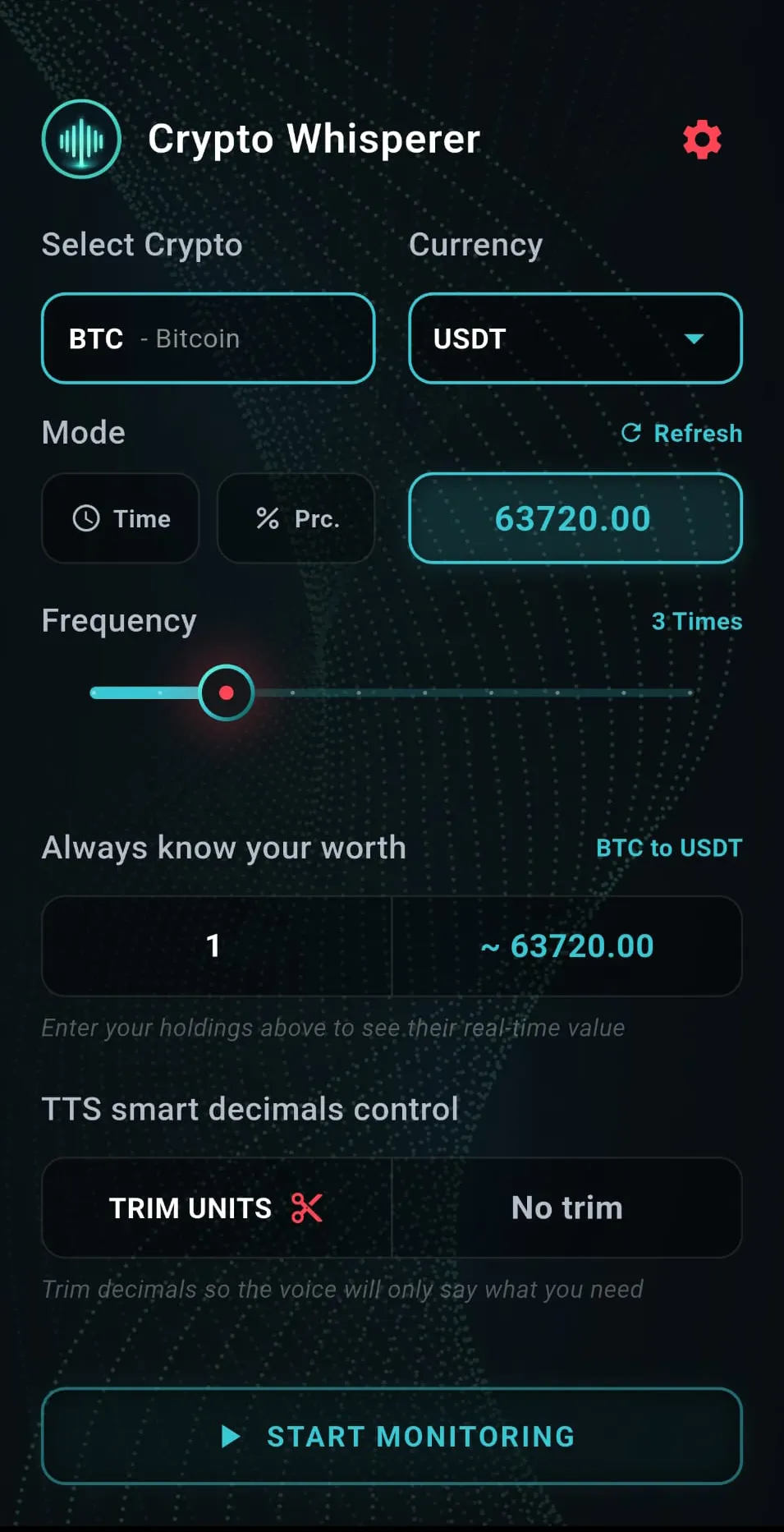
Home: set it in seconds
- Select Crypto. Search and pick any supported coin. Tap to open a fast searchable list and switch markets in a second.
- Currency. Choose the fiat or stablecoin you want prices spoken in, like USDT or USDC.
- Mode. Three ways to listen. Time for steady interval updates, Percentage for volatility thresholds, and Reaches for a target price you can snap to the live market with one tap, then set how often it repeats with Frequency.
- Always know your worth. Type your holdings and watch their live converted value, no login and no wallet required.
- TTS smart decimals control. Use Trim Units to cap spoken decimals so the voice says only the digits you need, or pick No trim to hear them all.
- Start monitoring. One tap launches the background service, locks in your settings, and lets you pocket your phone with the screen off.
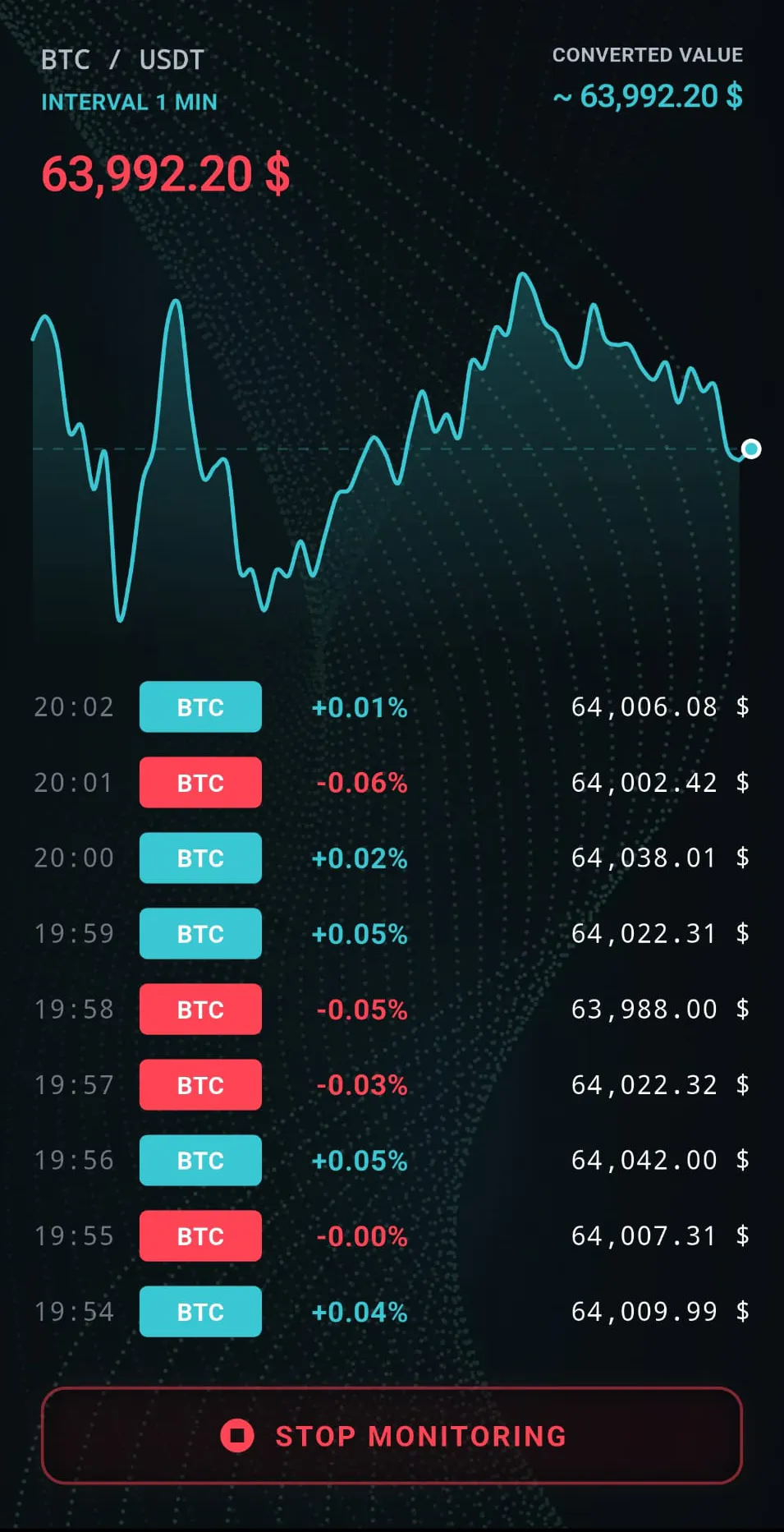
Monitoring: eyes-free, not data-free
- Live price and graph. The top shows your pair (here BTC / USDT) and the interval it is tracking (1 min), with the live price beside it. Top right, the converted value prices your holdings in real time, showing the value of a single unit until you enter your own amount. Glide a finger across the pulse graph to scrub back and pinpoint recent tops and bottoms.
- The event terminal. Every interval (one minute in this example) a new row is logged. A move down is marked red and a move up green, next to the timestamp, the percentage change, and the price at that moment, so you can read the recent history at a glance.
- Stop monitoring. Ends the session and shuts the background service down cleanly. You can also stop it straight from your phone's notification shade, without reopening the app.
- Screen off, voice on. The native service keeps speaking with your phone locked or sitting in your pocket.
- Lock and forget. Once monitoring starts you can lock the screen with confidence, the audio stream keeps running in the background.
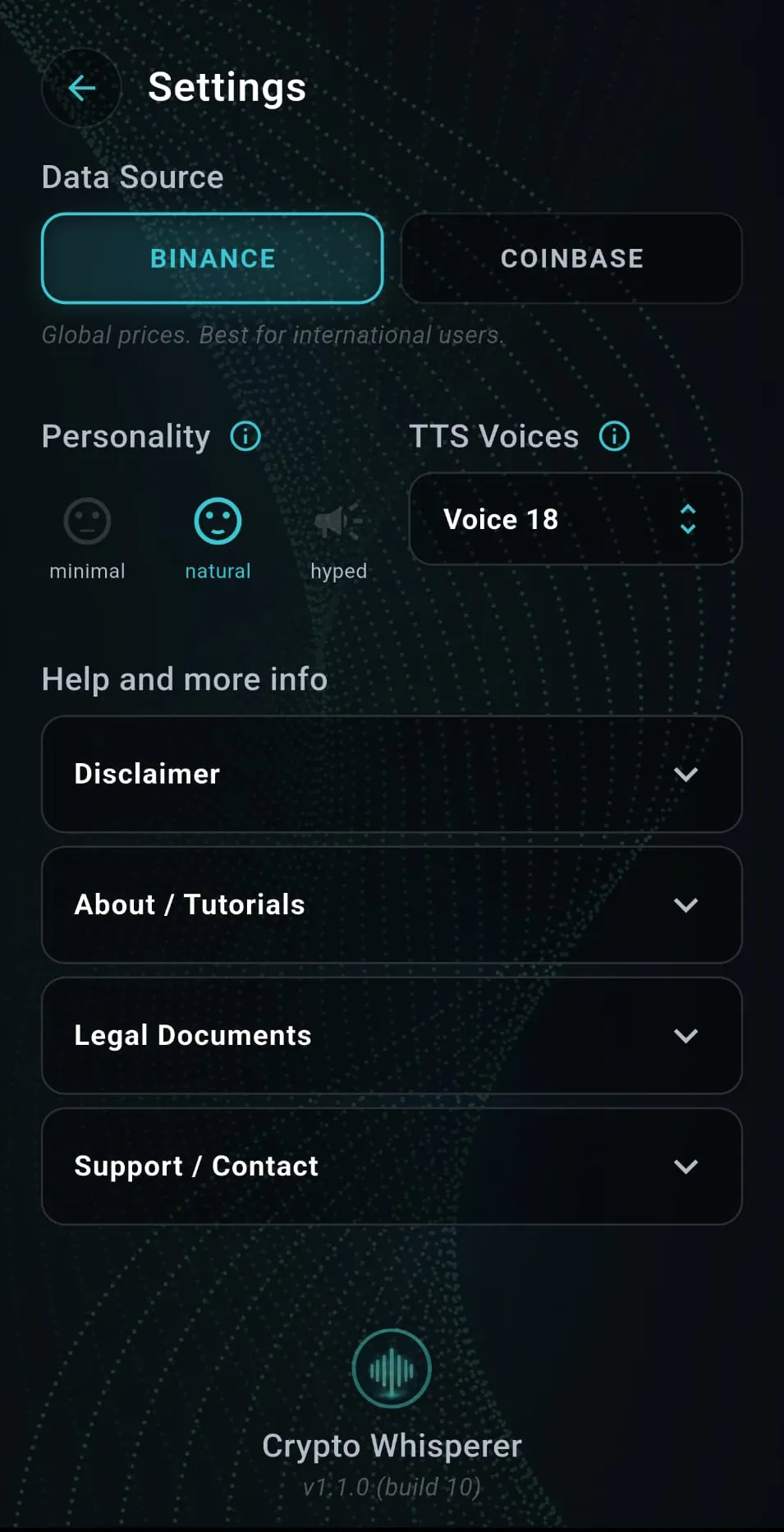
Settings: your voice, your source
- Data Source. Choose your exchange. Binance for global prices, best for international users, or Coinbase, so your audio matches the price action you trust.
- Personality. Set how the voice talks. Minimal for raw numbers, Natural for calm conversational updates, or Hyped for high-energy tracking.
- TTS Voices. The app ranks every installed offline voice by quality and latency and auto-picks the best one on first launch, and a voice you choose yourself is always respected. Only local voices are used, so alerts speak with zero network lag.
- Help and more info. Everything in one place: the Disclaimer, About and Tutorials, Legal Documents, and Support and Contact, each just a tap away.
No push servers. No cloud lag.
Most apps wait for a remote server to notice a price move, render a notification, and push it to you. By then, the market has moved on. Crypto Whisperer cuts the middleman out entirely.
Direct line to the data
Your phone connects straight to the exchange's public stream. No relay servers, no polling delays - updates arrive the moment the data exists.
Logic on your hardware
Thresholds, targets, and intervals are evaluated on-device. The app spots a numerical change the second it happens - not on a 30-second refresh cycle.
Voice without the cloud
Speech is generated locally on your phone's processor. Clear, instant audio - even on a weak signal.
Disclaimer: Crypto Whisperer is a technical monitoring utility intended for educational and informational purposes only. It does not provide financial, investment, or commercial advice, and never connects to real financial accounts or wallets.

Privacy, hard-coded.
- No data collection. We do not track, store, or sell your personal information or market interactions.
- Zero connectivity. The app never requests access to financial accounts, private keys, or crypto wallets.
- Informational only. All content is for personal use and is not a substitute for professional financial consultation.
Market data is provided via public APIs from Binance and Coinbase, for informational use only.

"I built this to break the distraction loop."
Like many people who follow the markets, I kept falling into the same routine. A notification would appear, and without thinking, I'd reach for my phone.
Read the full story
Unlock the phone. Open the app. Wait for it to load. Check the price. And… another notification, a news update - and suddenly five minutes are gone because I just wanted to see one alert.
A small interruption, but it happened again and again, all day. Each time it pulled my attention away from work, a walk, a book - anything that didn't involve charts.
I wanted a simpler way to stay aware of the market without staring at it. That idea became Crypto Whisperer. When a price moves, you hear it. No unlocking, no loading screens, no bouncing between apps.
This is a project from my small studio, Pixel Stream Media - no big team, just a developer who got tired of the loop. If it helps you keep your focus a little longer, it has done exactly what it was built to do.
Septimiu Balica
Support & feedback
Need help with technical settings, or have a feature suggestion? Use the form - technical inquiries typically receive a response within 24–48 hours.
- Technical support. TTS configuration, voice engine setup, or general app functionality.
- Data privacy. Everything you send is used strictly for support communication and never shared with third parties.
Always improving.
v1.1.0 Current - Jun 10, 2026
- NEW Fresh look: the app's signature color is now logo cyan, applied consistently across every screen.
- NEW "Reaches" mode redesigned - set a target price and snap it to the live market with a one-tap refresh; the target now follows your selected coin and currency automatically.
- NEW Cleaner mode controls: Time and Percentage are now compact icon toggles alongside the Reaches field.
- NEW Smart voice selection - the app ranks every installed offline voice by quality and latency and auto-picks the best one on first launch. A voice you choose yourself is never overridden.
- FIX Target alerts now always finish speaking before the session ends - no more cut-off announcements.
- UPDATE Sliders refreshed with new accent styling; clearer labels ("Time interval", "Reaches", "Frequency") and brighter unselected controls.
- UPDATE New app icon matching the cyan brand.
v1.0.7 Stability & polish - Apr 18, 2026
- NEW Media Controller integration in the system notification shade for better routing and control.
- FIX Background service upgraded to mediaPlayback for unlimited monitoring sessions on Android 15+.
- FIX "START MONITORING" button fully visible - no longer clipped by the system navigation bar.
- FIX Notification close button reliably stops the monitoring UI.
- FIX Fractional low-value amounts now show "< 0.01" instead of "~ 0.00".
- FIX "Done" on an empty search no longer auto-selects the first coin.
- FIX Coins without registered names display cleanly (e.g. "1000CAT").
- FIX Improved stability during long silent periods in Percentage Mode.
- STABILITY Persistent "Safe Kill" switch ends all network and audio tasks immediately on request.
- UPDATE "0.00" Smart Trim label renamed to "No trim"; version formatting cleaned up in Settings.
v1.0.6 Stability & data fixes - Apr 7, 2026
- FIX Back button returns to the main menu instead of closing the app.
- FIX BTC/USDC graph displays correctly on Coinbase.
- FIX No more duplicate ghost voices on older Android devices.
- REMOVED BTC, ETH, BNB as quote currencies to prevent infinite-loading edge cases.
v1.0.5 Stability & Network Guard - Mar 11, 2026
- NEW "Network Guardian" pauses monitoring on connection loss and announces restoration.
- NEW "Zombie Protection" prevents overlapping audio alerts after abrupt restarts.
- FIX Safeguards against overlapping API calls; graph no longer flickers between intervals.
v1.0.4 Customization & Smart Trim - Feb 28, 2026
- NEW Smart Trim keeps TTS announcements concise.
- NEW Personality Modes: Minimal, Natural, Hyped.
- NEW "Always know your worth" holdings calculator on the dashboard.
- FIX Precision crash with zero-decimal exchange tickSize data.
v1.0.3 UI & Landscape - Feb 5, 2026
- NEW Full landscape mode with side-by-side terminal layout.
- NEW Live PriceGraph widget above the event log; CryptoSearchSheet for coin selection.
- FIX Removed the default Android overscroll glow.
v1.0.2 "Deep Doze" Background - Jan 15, 2026
- NEW AlarmClock API timer guarantees wake-up even in Deep Doze.
- NEW Audio Focus management: ducks other media, skips speech during calls.
- NEW Dynamic fetching of local offline voices for zero-latency announcements.
v1.0.0 Initial release - Jan 1, 2026
- LAUNCH Hands-free background crypto monitoring is born.
- LAUNCH Time intervals and percentage thresholds; Binance WebSockets + Coinbase REST.
- LAUNCH Dark terminal interface, local data storage, dynamic disclaimer fetching.